Introduction
Every lead starts with interest.
A customer fills out a contact form, sends an email, requests an estimate, or asks for more information because they are actively looking for help.
The challenge is that many businesses do not respond quickly enough.
In today's competitive market, customers often contact multiple businesses before making a decision. If your response is delayed, the opportunity may go to a competitor who replied first.
The good news is that improving lead response times does not require a large team or complicated systems. A few practical changes can help your business respond faster, create better customer experiences, and win more opportunities.
Why Lead Response Time Matters
When a customer reaches out, their interest is usually highest at that moment.
Whether they are requesting a quote, asking about services, or looking for additional information, they want answers while the need is fresh in their mind.
If a customer contacts three businesses and only one responds quickly, which company is most likely to earn their trust?
Fast responses demonstrate professionalism, reliability, and attention to customer needs.
Even if you cannot provide a complete answer immediately, acknowledging the inquiry can create a strong first impression.
Common Reasons Businesses Respond Slowly
Busy Schedules
Many small business owners wear multiple hats.
They handle sales, customer service, operations, and administration while also performing the work that generates revenue.
When the day gets busy, incoming leads can easily fall to the bottom of the priority list.
Lack of a Response Process
Leads often arrive from multiple sources:
- Contact forms
- Phone calls
- Social media messages
- Estimate requests
Without a consistent process, important inquiries can be overlooked or delayed.
Rewriting Similar Responses
Many businesses answer the same questions repeatedly.
Customers often ask about pricing, services, availability, timelines, or next steps.
Writing every response from scratch takes time that could be spent serving customers.
Practical Ways to Respond Faster
Create Response Templates
One of the easiest ways to improve response times is to create templates for common inquiries.
Examples include:
- Estimate requests
- Consultation requests
- General service inquiries
- Follow-up responses
- Appointment confirmations
Templates reduce repetitive writing while still allowing you to personalize each response.
Schedule Time to Review Leads
Instead of reacting to every notification throughout the day, consider setting dedicated times to review new inquiries.
For example:
- 9:00 AM
- 12:00 PM
- 4:00 PM
This creates consistency and helps ensure leads do not remain unanswered.
Use Simple Automation
Automation can help acknowledge inquiries immediately.
A simple confirmation message lets customers know their request was received and that someone will respond shortly.
This small step can improve customer confidence while buying your business additional response time.
How AI Can Help
Artificial intelligence is becoming a practical tool for businesses that regularly respond to customer inquiries.
Rather than replacing people, AI can help reduce repetitive writing and speed up the drafting process.
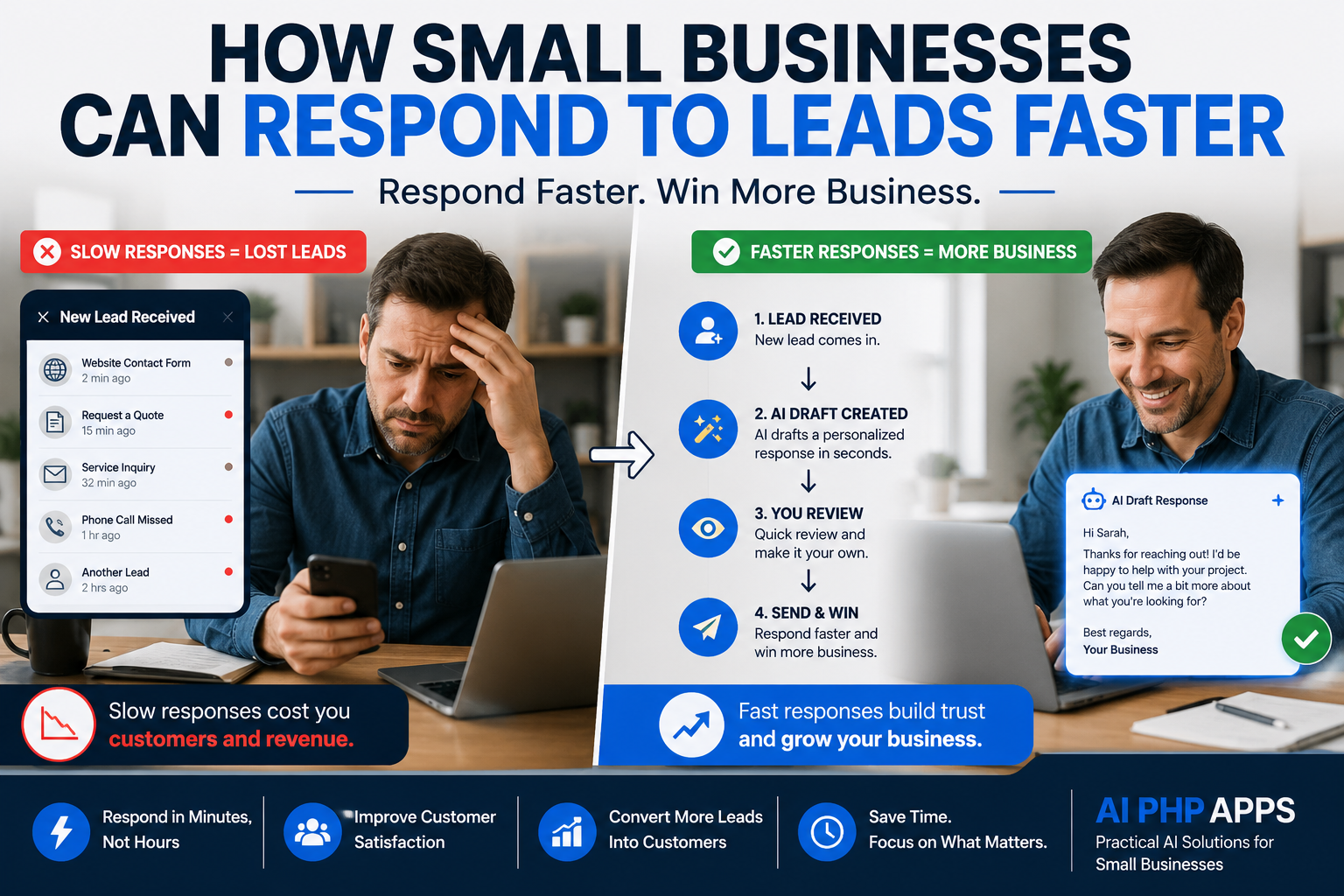
A common workflow might look like this:
- A new lead arrives.
- AI drafts a response.
- The business reviews the draft.
- The response is sent to the customer.
This approach helps save time while keeping the business owner in control of the final message.
For companies handling a high volume of inquiries, even a few minutes saved per response can add up significantly over time.
When Human Review Still Matters
While AI can assist with drafting responses, human review remains important.
Business owners should always review communications involving:
- Pricing information
- Contracts
- Project commitments
- Custom requests
- Complex customer questions
Technology should support customer relationships, not replace them.
The goal is faster communication while maintaining accuracy and professionalism.
How Faster Responses Can Win More Business
Customers often contact multiple businesses before making a decision.
Being the first company to respond does not guarantee a sale, but it does increase your chances of starting the conversation.
Quick responses demonstrate professionalism and show customers that their time is valued.
Even a short response acknowledging the inquiry can help build trust and keep the conversation moving forward.
Using AI to Assist Lead Follow-Up
Businesses that regularly receive inquiries can benefit from tools designed specifically for lead response workflows.
For example, an AI-powered lead response assistant can help draft replies, suggest follow-up messages, and reduce the time spent writing repetitive responses.
The final message remains under your control, but the drafting process becomes significantly faster.
This allows business owners to focus more on serving customers and less on repetitive administrative work.
Frequently Asked Questions
How quickly should I respond to a lead?
The sooner the better. Even a simple acknowledgment can help reassure the customer that their inquiry has been received.
Should every response be personalized?
Yes. Templates and AI drafts can save time, but personalization helps build stronger customer relationships.
Can AI replace customer communication?
No. AI should be viewed as an assistant that helps draft responses faster. Human review remains important.
What if I receive leads outside business hours?
Automated acknowledgments can help reassure customers that their request has been received and will be reviewed soon.
Do small businesses really benefit from faster response times?
Absolutely. Faster responses help create positive first impressions and may prevent potential customers from moving on to competitors.
Final Thoughts
The businesses that respond quickly are often the businesses that win more opportunities.
Improving lead response times does not require a complete overhaul of your workflow. Small improvements such as templates, better organization, scheduled follow-ups, and AI-assisted drafting can make a significant difference.
The goal is not to replace people.
The goal is to spend less time writing repetitive responses and more time helping customers.
By creating a consistent process and using available tools wisely, small businesses can improve customer experiences while increasing the likelihood of winning new business.